The Best BigCommerce Bundle Builder
Sweeten the deal for your customers by building products together into customizable kits.
Utilizes Product Variants and Modifier Options:
Craft unique combinations that cater to different customer preferences and provide a personalized shopping experience like never before.
Customizable Bundle Pricing:
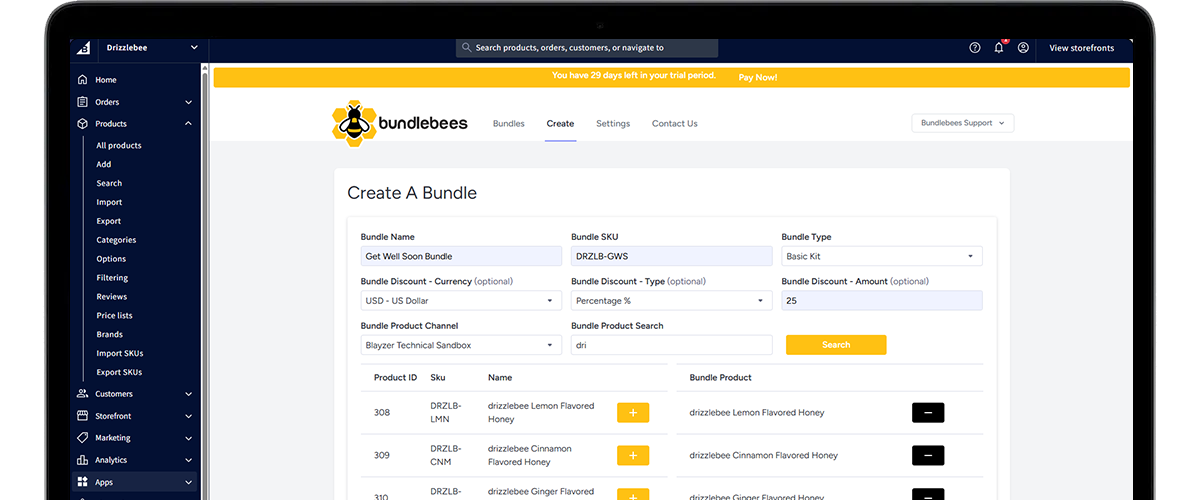
Set flexible pricing options for your bundles, such as percentage discounts or fixed pricing, giving you the freedom to experiment and optimize your offers for maximum profitability.
Smart Inventory Protection:
Bundlebees monitors stock for each product in your bundles, disabling them when items go out of stock and preventing customers from exceeding what's in stock.
Easy-to-Use Interface:
Bundlebees makes it easy for you to create, manage, and update your product bundles with just a few clicks. No technical expertise required!
Edit Existing Bundles:
Whether you want to add new products, change pricing, or modify bundle configurations, you can do it all effortlessly with bundlebees' intuitive editing tools.


Get Started in Minutes

1. Install Bundlebees from the BigCommerce App Store
Launch the app from your BigCommerce control panel to get started.
2. Give your bundle a name and SKU
Choose something descriptive that helps your customers understand what they're getting.
3. Choose your bundle type
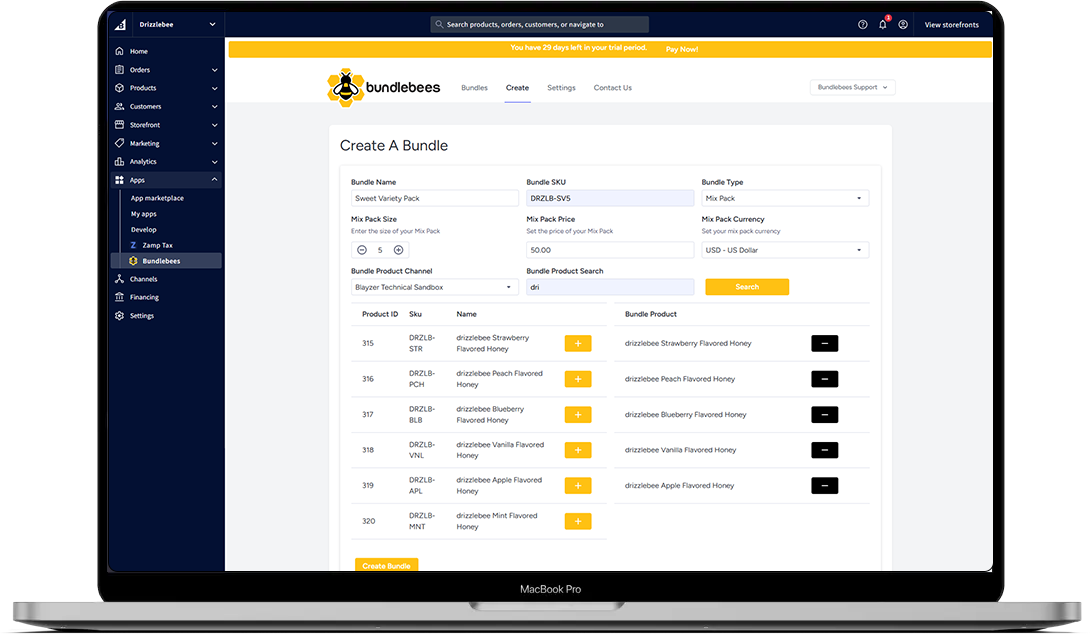
Select from a Basic Kit, Mix Pack, Fixed Kit, Build-Your-Own Kit or Linked Kit depending on how you want to sell your products together.
4. Configure your bundle settings
Set your pricing, discount, pack size, currency, and storefront channel based on the bundle type you chose.
5. Add products to your bundle
Search your store's inventory by product name or SKU and add the products you want to include.
6. Click Create Bundle
Bundlebees creates your bundle product automatically. You'll be redirected to the Edit Product page where you can add images, videos, assign categories, brands, custom fields, and more.
Our Pricing Plans & Packages
Basic
$19.99/mo15-day free trial included
All five bundle types (Basic Kit, Mix Pack, Fixed Kit, Build-Your-Own Kit, and Linked Kit)
Unlimited bundles
Variant and modifier option support
Automatic stock monitoring and bundle disabling
Customizable storefront colors
Home page and category page display controls
Multi-channel support
Automatic bundle discounts
Note! Prices may vary from location to location due to local taxation laws and conversion rates from U.S. Dollars.
Why Bundling Matters:
Bundling products together is a proven strategy to increase the average order value and boost customer satisfaction. Bundlebees empowers you to create enticing product bundles effortlessly, offering your customers more value and motivating them to purchase multiple items in a single transaction.
Have Questions? Look Here.
Some of the frequently asked questions about bundling with Bundlebees.
Absolutely! You can set bundle discounts on Basic Kit, Build-Your-Own Kit, and Linked Kit bundles, each uses a percentage discount through the BigCommerce Promotions API to lower your bundle's price and drive sales. On the Mix Pack and Fixed Kit Bundle Types, you give a discount by setting the price to what you want the customer to pay for the bundle instead, which also runs through the Promotions API.
You can choose to hide the bundle if a product is close to out-of-stock. For Fixed Kit, an out-of-stock product among its fixed contents automatically disables the whole bundle, since a Fixed Kit's contents can't be swapped for something else. For Basic Kit, Mix Pack, Build-Your-Own Kit, and Linked Kit, an out-of-stock product gets flagged as unavailable on its own while the rest of the bundle stays live, and the bundle itself follows your own enable/disable toggle. Quantity increments for a product will also stay capped at the available amount in stock for that product.
Customers can adjust quantities in the Basic Kit and Mix Pack, and select both variants and modifier options for products within bundles. The Fixed Kit is fixed in place and only allows choosing variants if they aren't set at the bundle level, and modifier options if they're present on the individual products within the bundle. The Build-Your-Own Kit and Linked Kit work a little differently: quantity per part is set by you rather than adjusted by the customer, but customers still choose which product fills each part, or each main product, along with any variant or modifier options that product has.
No. The Bundlebees App requires you to have the most recent, up-to-date version of the BigCommerce Product Catalog (v3) in order to function properly.
No. Bundle Products never get added to the cart. Only the individual items contained within the Bundle are added to the cart when a customer clicks Add To Cart at the quantity specified. If a discount or custom price is set, it is handled by the BigCommerce Promotions API according to which individual products are present in the cart and at what quantity where applicable.
Yes! Bundlebees includes an App Settings page where you can set a primary and secondary color (using hex values) that are applied across the bundle UI on your storefront. You can also control whether bundles appear on your home page and category pages, or limit them to product pages only.
Bundlebees is compatible with most BigCommerce themes out of the box. However, we cannot guarantee compatibility with every theme, as it can depend on the level of customization applied to your theme and whether any third-party plugins or scripts interfere with the bundle UI. If you experience any display or functionality issues, please reach out to our support team and we'll do our best to help.
Yes! All new Bundlebees installations include a 15-day free trial so you can explore all of the app's features before committing to a subscription. No credit card is required to get started. Once your trial period ends, you'll be prompted to subscribe to continue using Bundlebees.
Bundlebees offers five bundle types. The Basic Kit groups a set of products together with an optional discount, where customers must add at least two products to their cart to qualify for the bundle pricing. Customers can adjust quantities and select variants and modifier options for each product. The Mix Pack lets customers build their own bundle by choosing from a pool of products to fill a set pack size (e.g. pick any 6), with you setting the pack size, price and currency. The Fixed Kit is a pre-configured bundle with a set price where specific products and variants are fixed in place, including the ability to add multiple variants of the same product. Customers can still select modifier options where available. The Build-Your-Own Kit lets customers customize a kit from parts and add-ons you define, with an optional parent product as an anchor if you want one. Each part can be marked required or optional, hold several selectable products, and carry its own quantity, so the customer decides exactly what goes into their kit before it's added to the cart. The Linked Kit works around a main product the customer picks first, something like a flavor or size, and each main product you set up carries its own independent set of parts and add-ons. You can add as many main products as the kit needs, and cloning an existing one's parts and add-ons into a new one makes building out several similar options a lot faster than starting each from scratch.
Still have a question? Ask your question here
Subscribe For Updates
Subscribe to our newsletter now and our delivery bee will buzz you our best deals, ideas and news about BundleBees App


No spam. Unsubscribe anytime.